Incident Analysis • Edge & CDN Resilience
Cloudflare Outage — November 18, 2025: What Was Reported and What to Learn
About this article. This is an analysis based on public information. It is not a post-mortem written by DevOps City and we had no access to Cloudflare's internal systems. The facts and times below come from Cloudflare's own account, “Cloudflare outage on November 18, 2025”. Sections that are our own opinion are labeled as such. If Cloudflare updates its account, the original source takes precedence.
What happened
According to Cloudflare, its network began failing to deliver core traffic at about 11:20 UTC on November 18, 2025. Internet users saw error pages when visiting sites that use Cloudflare. Cloudflare stated that the issue was not caused, directly or indirectly, by a cyber attack or malicious activity.
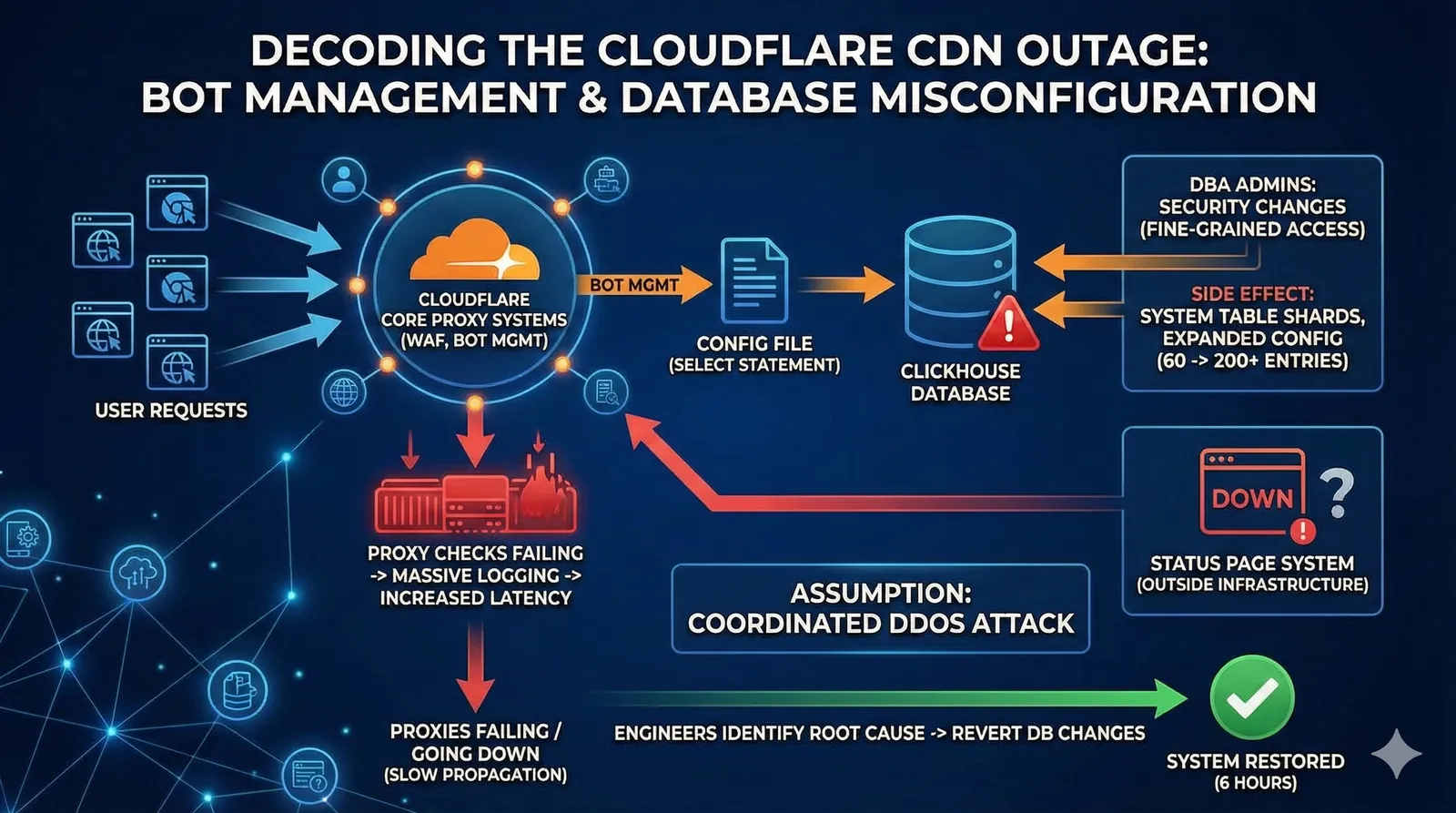
Cloudflare reported that a change to database permissions caused a query to return duplicate rows. That query builds a “feature file” used by the Bot Management system, and the file roughly doubled in size. The software that reads the file had a limit on the number of features. The doubled file exceeded that limit and the software failed.
Timeline as reported by Cloudflare
| Time (UTC) | Event (per Cloudflare) |
|---|---|
| 11:05 | Database access control change deployed. |
| 11:28 | Impact starts: the change reaches customer environments and the first errors appear on customer HTTP traffic. |
| 11:32–13:05 | The team investigates elevated errors in Workers KV. Cloudflare describes an early belief that the symptoms might be a large DDoS attack. |
| 13:05 | Bypasses for Workers KV and Cloudflare Access reduce impact. |
| 14:24 | Creation and propagation of new Bot Management configuration files stopped. |
| 14:30 | A known-good configuration file is deployed globally; main impact resolved. |
| 17:06 | All services resolved. |
Source: Cloudflare's published timeline. Some rows are condensed.
The technical anatomy (as Cloudflare described it)
How the faulty file was produced
- Every request passes through Cloudflare's core proxy, which runs modules for security and performance products. One of them is Bot Management.
- Bot Management uses a machine-learning model that reads a “feature” configuration file. The file is regenerated every few minutes by a query against a ClickHouse database cluster and published across the network.
- At 11:05 Cloudflare changed ClickHouse permissions so that users could see metadata of the underlying tables in a second database (
r0) as well as thedefaultdatabase. - The query that builds the file did not filter by database name, so after the change it began returning duplicate rows, which more than doubled the number of features in the file.
Why the failures came and went
- The permissions change was rolled out gradually across the ClickHouse cluster. The bad file was only generated when the query ran on an updated part of the cluster.
- As a result, every five minutes either a good or a bad file could be generated and propagated, and the network alternated between recovering and failing.
- Eventually every ClickHouse node produced the bad file and the failure became steady.
- The Bot Management module has a limit of 200 features, set well above the roughly 60 in normal use. The doubled file exceeded the limit, the proxy code hit an unhandled error, and requests that depended on the module returned HTTP 5xx errors.

The investigation
Cloudflare wrote that it initially suspected a hyper-scale DDoS attack. Two things contributed: the system recovered and failed again as good and bad files alternated, and Cloudflare's status page, which is hosted off Cloudflare's infrastructure, went down at the same time. Cloudflare says that was a coincidence. It later identified the Bot Management configuration file as the trigger.
Our takeaway (opinion): a configuration file that your own systems generate deserves the same validation as input from outside. Cloudflare lists the same idea among its follow-up actions.
Recovery as reported by Cloudflare
- Stopped generation and propagation of the bad feature file.
- Inserted a known-good file into the distribution queue and forced a restart of the core proxy; main impact was resolved at 14:30 UTC.
- Restarted remaining services that had entered a bad state; all services were normal by 17:06 UTC.
- Used bypasses for Workers KV and Access at 13:05 to reduce impact earlier.

Follow-up actions Cloudflare announced
- Harden ingestion of Cloudflare-generated configuration files in the same way as user-generated input.
- Enable more global kill switches for features.
- Stop core dumps and other error reports from overwhelming system resources.
- Review failure modes for error conditions across all core proxy modules.
Takeaways for platform teams (our opinion)
These are DevOps City recommendations drawn from the public account. They are not statements about Cloudflare's internal practices.
- Validate generated configuration. Check size, shape, and diff against the last good version before publishing, and keep a fast way to fall back to it.
- Review cross-system effects of access and schema changes. A permissions change in one system altered the output of a query in another. Ask which consumers depend on the old behavior.
- Plan for bounded failure. Decide in advance whether a component fails open or closed when its input is invalid, and avoid unhandled errors on the request path.
- Keep a kill switch for each feature on the critical path.
- Keep status and observability off the production path, and rehearse incidents where symptoms look like an attack but are not.
Signals worth watching (our suggestions)
If the table is cut off on your screen, scroll it sideways to see every column.
| Category | Signal | Why it matters |
|---|---|---|
| Generated configuration | File size and entry-count change versus last good | Early warning for unexpected growth or duplication |
| Proxy health | Rate of 5xx errors and crash or restart counts | Detects a bad configuration load quickly |
| Change management | Permission or schema changes linked to dependent jobs | Connects a change to its downstream effect |
Sources
- Cloudflare, “Cloudflare outage on November 18, 2025” (all facts, times, and quoted figures above).