AI Platforms • Executive Briefing
Gemini Enterprise and Workspace with Gemini: Questions for CIOs
About this article. This is an opinion brief based on public information. DevOps City is not affiliated with Google. Google renames, repackages, and re-prices these products often, so editions, features, and licensing described here may be out of date. Confirm current details on Google's Gemini Enterprise page and with Google before you make a purchase decision. The two diagrams below were drawn by DevOps City for this article. They are simplified illustrations, not Google diagrams.
Before we begin: What is Gemini?
Gemini is Google’s family of generative-AI models and tools used across products—from search and code to productivity and cloud. It’s a unified, multimodal engine that can reason over text, code, and images to assist users and applications.
Google Workspace with Gemini brings those capabilities into Gmail, Docs, Sheets, Slides, and Meet. Think of it as a personal AI collaborator that helps people write, summarize, analyze, and present. Availability and licensing depend on your Workspace plan, so check Google's current terms.
Gemini Enterprise (formerly Agentspace) is Google's offering for using Gemini across business data and applications. Google's product page says it works across email, documents, code, data, and business apps, runs under each person's existing permissions, and keeps an audit trail. Google also lists integrations with many third-party systems. It notes that some capabilities are in early access. Check which features are generally available for your edition.
Why this matters now
Google now sells its enterprise agent and search offering as Gemini Enterprise (formerly Agentspace), alongside Google Workspace with Gemini (the assistant inside Workspace apps). In our view, CIOs should understand the difference because it can affect funding, ownership, and governance. How the two differ in practice is changing, so verify it for your plan.
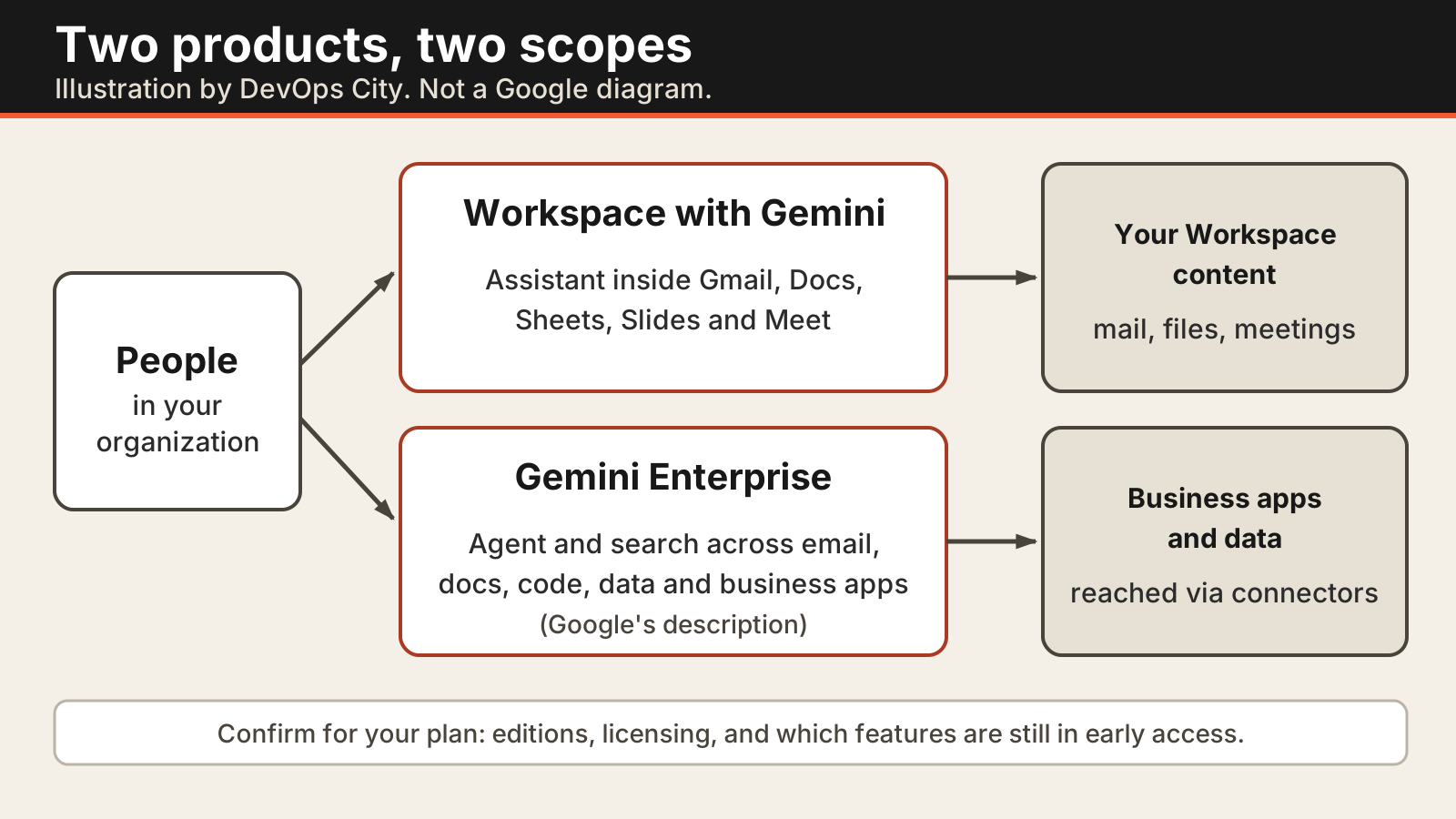
Two products, two scopes
This diagram is our simplification of how Google describes the two products. It is not a Google diagram and it is not an architecture. Google's wording, the edition list, and the licensing terms change often, so confirm them on Google's current pages before you rely on them.
Where to check controls
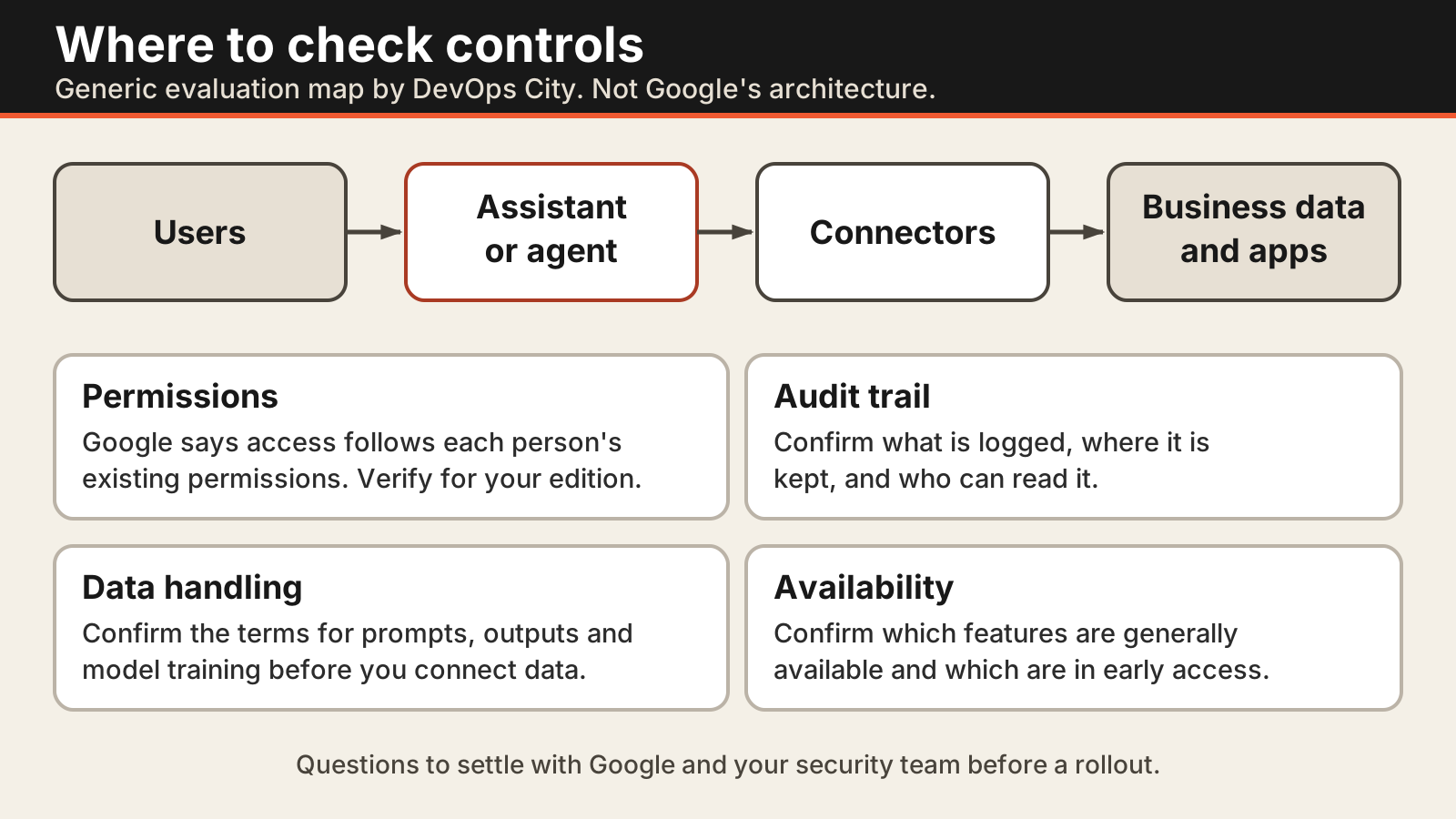
Whichever product you evaluate, the same four questions apply. This is a generic evaluation map, not Google's architecture. Google says Gemini Enterprise runs under each person's existing permissions and keeps an audit trail. Verify how that works for your own identity setup, connectors, and edition.
Questions to ask when comparing the two (our view)
These are DevOps City's suggested evaluation questions, not statements of fact about either product.
- Scope: is the goal help inside Gmail, Docs, and Meet, or search and agents across business systems?
- Governance: which admin controls, permissions, audit logs, and data-handling terms apply to each, and who owns them?
- Extensibility: what can your teams build or integrate, and which of those features are generally available rather than early access?
- Licensing: how is each product licensed and priced for your organization, and what is bundled with what you already pay for?
Rule of thumb (opinion): if your priority is agents or search across line-of-business systems, evaluate Gemini Enterprise. If it is productivity inside Gmail, Docs, and Slides, evaluate Workspace with Gemini. Many organizations will evaluate both.
Execution plan for CIOs (our suggestions)
- Stand up a platform squad: own connectors, policy guardrails, evaluation, and the release process.
- Pick 2–3 lighthouse use-cases: one internal, one external/customer-facing; measure ROI and safety incidents.
- Establish shared controls: for example Access Transparency, VPC-SC, CMEK, org policies, and incident playbooks. Confirm which apply to your edition.
- Developer enablement: blueprints, sample agents, CI/CD templates, and a prompt/artifact registry.
Sources
- Google Cloud, Gemini Enterprise product page (permissions, audit trail, integrations, early-access note).
- The diagrams above are original illustrations by DevOps City and are not taken from Google materials.